
The group game step by step
A whole class plays one sequence of numbers, your button deals them and the server keeps the score. Here is the whole thing from the home page to the standings read out, and at every step a picture of what the screen really looks like.
Before you start
- An internet connection. The group game runs through the server, it does not work offline. Where there is no signal, paper stays: it is on Math Poker at school.
- A phone or a computer for every player. The browser it already has is enough. Nothing gets installed and nobody signs up.
- Ten minutes. A round takes no more than that, even with the explaining. There are 25 turns and one of them is a matter of a few seconds.
One lobby holds fifty players, so it covers two classes at once. Everyone in it gets the same sequence of numbers, so what gets compared is decisions, not luck on the cards.
Step 1 · Where to find the game
The home page has a Group game tile. It leads to the page where a lobby is created and where everyone else joins it. Both sit together, so all you send the pupils is the same address you use yourself.

On a phone the bar at the top folds into the hamburger and the whole site opens from there. The group game sits in the menu under the heading Pages, right next to the theme and the language.

Step 2 · Create the lobby
The group game page holds two cards. One creates a lobby, the other joins one. You fill in the first, the pupils the second.

Your nickname
The name the line-up sees, 24 characters at most. It writes nothing to the leaderboard or to your profile and holds only in this lobby. An empty field is named “Player”.
Difficulty
Easy has no clock: a number waits until the player places it. Hard adds a countdown to every number. Take easy into the first lesson; there a countdown only adds confusion to rules the class does not know yet.
Seconds per number
It only shows up on the hard difficulty, takes 3 to 300 seconds and offers twenty. Everybody has a countdown of their own from the moment the number reaches them, so a slower player loses none of their time. Whatever you miss is lost.
I play too, not just deal
Ticked, it gives you a grid of your own and you play along with the class. Unticked, it makes you the dealer and nothing else: you have no grid, the console shows you the last number drawn and the line-up gives you the dealing tag. It is chosen when the lobby is created, never in the middle of a game.
Players see the points preview on empty cells
Turned on, it writes into every empty cell how many points the waiting number would score there. Turn it off when you want the class to count the points themselves. It holds for the whole group and is set only when the lobby is created; changing it mid-game would move the goalposts. That it is off is written in the waiting room too, after the difficulty.
Step 3 · Send the code around
Once the lobby is created the waiting room opens. The code is three digits, so saying it out loud is enough. There are no letters in it, nothing to mistake.

Copy the code puts the bare number on the clipboard, Copy the link the whole invitation. Anybody who opens the invitation joins on their own and only types a nickname; there is nothing to copy out and nobody is left standing on the entry screen.
Only the host sees the QR code. The Enlarge the QR button spreads it across the whole screen with the code underneath. If you are projecting, it saves you the dictating: the class joins by taking a picture of it.

Once you start the game, nobody else can join. A latecomer would have an empty grid and the whole queue of drawn numbers in front of them. Wait until everybody is in the line-up; the number beside the Line-up heading says how many of the fifty are there.
Step 4 · Start the game
Only you see the Start the game button. Press it and the grid opens for everyone at once, waiting for the first number. You deal it with Draw a number: everybody gets the same sequence and each of them arranges it on a grid of their own.

What sits where on the screen
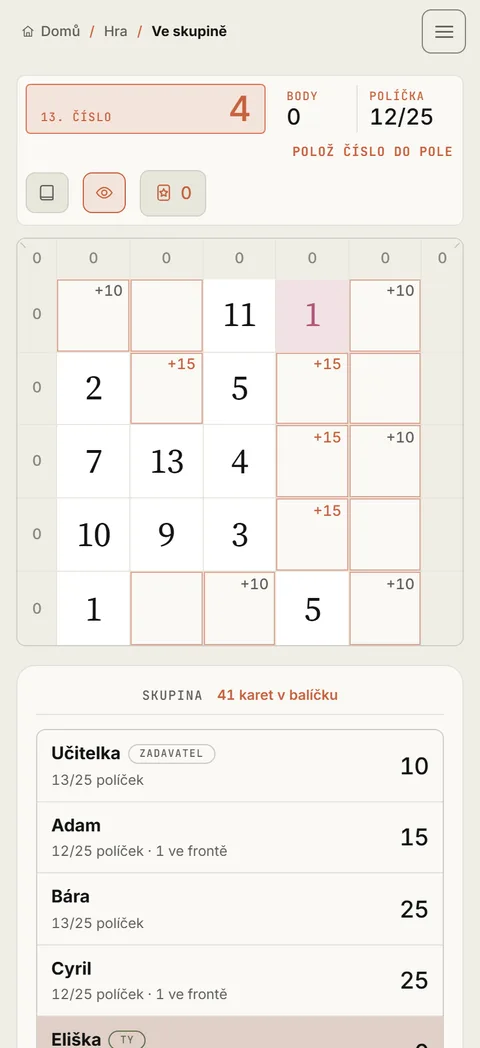
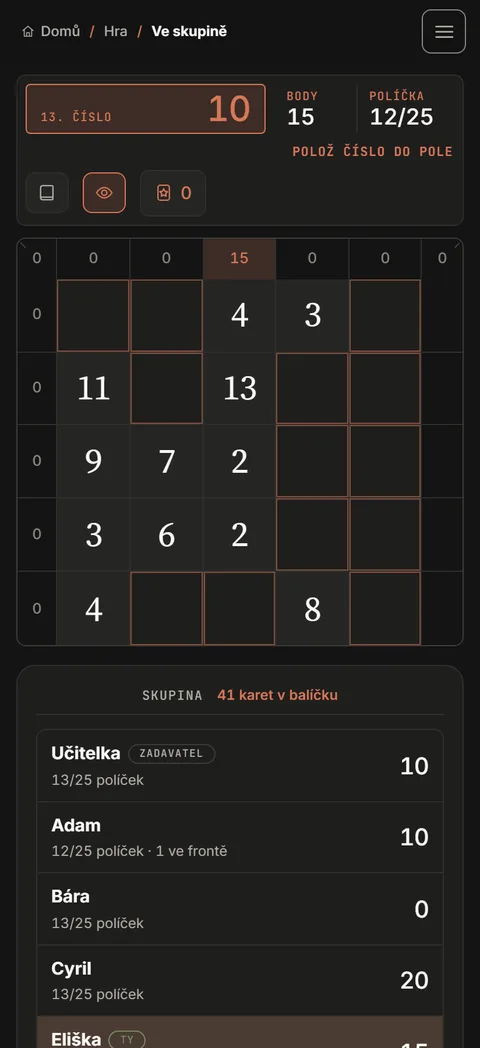
The console at the top

- The number on the left is the one just dealt. A joker shows a star instead of a value.
- Score and Cells count your own grid, not the whole group.
- The message in the console says what is being waited for: you, or the others finishing their move.
- Draw a number deals the next number to the whole group. Only you see this button.
- Draw everything deals the rest of the deck at once. From then on nobody is waited for and everyone places at their own pace; handy when there are five minutes left before the bell.
- The small chips by the buttons are the scoring table, the score preview switch and the badge of kept jokers.
The side panel

- Next to every name run the filled cells out of twenty-five and the score. It all updates as the round runs, with nothing to click.
- Anybody who has fallen behind the queue has how many numbers are waiting for them written beside their name. Anybody who puts the game aside and switches to something else stops placing, and the queue by their name grows; you can see it from the front of the room, without walking the aisles.
- On the hard difficulty it adds how many cells each of them lost to the clock.
- The tags by the names say which one is you, who is the host, who only deals and who has left.
- Above the list stands how many cards are left in the deck. Once the game is over, what ended it is written there instead.
- Below the list you have End the game and Leave. Play again only shows up once it is over.
Nothing is found out about anybody else's screen. All that shows is what a player did in the grid, or did not.
On a pupil's phone
A pupil has no button to draw with, just the grid and the line-up below it. Everyone switches the theme for themselves and the page behaves the same in both, so what anybody has set is nothing you need to worry about.
During the game
You need not wait for the last one
The next number can be drawn even while somebody has not placed yet. The numbers stack up in a slower player's queue and they work through them in order, losing none of them. On the easy difficulty there is nothing you can spoil this way; on hard everybody has a countdown of their own, so dealing fast costs nobody their thinking time.
The group gets a joker all at once
There are two of them in the 54 cards. Everyone picks a value of their own for it, 1 to 13, or keeps it for later. A kept joker is then played out of turn: it spends a cell, not a number from the queue, so it can be used with a number still in hand and it outlives the end of the deck. Thinking it over in the dialog does not count into the countdown. The full rules are on the Rules page.
When somebody drops out
A game in progress lives on the server, not in the browser, so a pupil who reloads the page comes back where they left off. That needs storage turned on; without consent the browser does not remember their place in the lobby. On the hard difficulty, after a minute and a half of silence the server starts forfeiting numbers for anybody who has gone quiet, so the whole class is not held up by one of them.
Leaving in the middle of a game
Anybody who leaves has their grid closed, but drops out of the standings. If you leave, the game ends for the whole group and the standings are shown from whatever everyone managed: the host's role is not handed on, and in the middle of a round it is fairer to close it. There is no throwing a player out of the group; the only lever you have is a fresh round.
The end of the game and the standings
A round ends on its own once the deck is spent and everyone has worked through their queue, or once everyone has filled their grid. You can end it yourself with End the game, when the bell goes, say.

The ranking goes by points, and by the number of filled cells when those are equal. Equal results share a place, so three identical scores make three firsts.
Play again deals another round to the same line-up, with the same code and nobody joining afresh. Anybody who has left in the meantime does not come back into it.
- Nothing goes into the public leaderboard. The game runs on shared numbers under the host's baton, and there would be no comparing that with games played for the leaderboard.
- The round does count into your personal statistics in your profile and into the totals for the whole game.
- The group standings live only in the lobby and go with it; it is cleaned up six hours after the last action. Whatever you want to keep, copy it out or photograph it before you close the tab.
A lesson in English
The whole game speaks Czech, Slovak, English, Polish, German and French; the flag in the bar switches between them. For an English lesson or for CLIL you can start in English straight away: open the group game in English and the language travels with the invitation too, both the link on the clipboard and the projected QR code. The whole class ends up in the English version whether they switch anything themselves or not.
It is not only the game sheet that is translated: the board, the console, the standings, the scoring table and the rules are in English as well, so the lesson runs in one language from the code to the final standings. The vocabulary the pupils get to handle is the numbers, row, column, diagonal and the names of the combinations.
The same holds for Slovak, with the group game in Slovak. Nobody loses anything by switching in the bar instead: switching needs no reload and a game in progress survives it.
When something goes wrong
“There is no lobby with that code.”
Almost always a typo, or a code from an earlier lesson. The code has three digits and holds as long as the lobby lives; six hours after the last action it is cleaned up. Create a new one and project it again.
“The game has already started, there is no jumping into a round in progress.”
The pupil turned up late. Let them watch and take them into the next round with Play again, or end the game and start it over once everybody is in the line-up.
“The lobby is full.”
Fifty places is the ceiling. For more people, create a second lobby; each has a sequence of numbers of its own, so results are not compared between them.
“Hold on, those numbers are coming too fast.”
The server turns down two draws right after each other, so the group has a moment to take it in. Wait a second and click again.
The server is not answering
The group game needs a connection; without one you cannot even create a lobby. A bar with a Try again button lights up at the top when that happens. Your place in the lobby is held, so a player comes back where they were once the outage passes.
Common questions
Do pupils have to install anything?
No. A browser and the address are enough. No account is created and all that goes into the lobby is a nickname the pupil types themselves.
Can I tell who is playing and who is elsewhere?
The side panel runs, next to every name, the number of filled cells, the numbers queued up and the score. Anybody who stops placing shows up at once. Nothing else is found out about their screen.
Can I play with them, or only deal?
Either. The I play too box is ticked by default; untick it and you have no grid of your own and only deal the numbers. It can be switched only while the lobby is being created.
How long does one round take?
Twenty-five turns, so five to ten minutes. When time is short, deal the rest of the deck with Draw everything, or end the game and have whatever is on the grid scored.
How many pupils fit into one lobby?
Fifty, which covers two classes at once. For more people a second lobby is created; each has a sequence of numbers of its own, so results are not compared between them.
And if phones are not allowed in the lesson?
Then paper stays. The printable 5×5 game sheet, the classic school scoring table and how to run a round with no screens are all on Math Poker at school.